We’re excited to announce the general availability of the TIBCO ActiveMatrix BusinessWorks™ Plug-in for MQTT v6.0.0—bringing the world’s most widely adopted IoT messaging protocol into the enterprise integration platform trusted by organizations worldwide.
Executive Summary
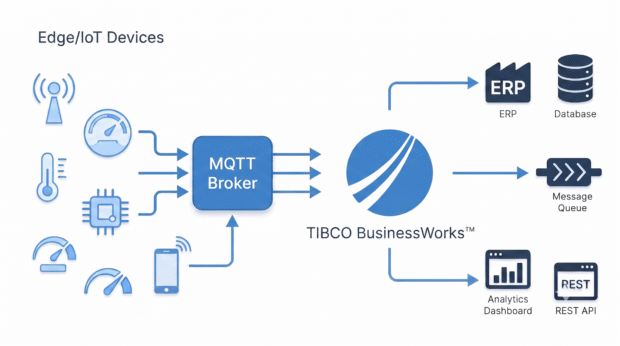
The TIBCO ActiveMatrix BusinessWorks™ Plug-in for MQTT v6.0.0 connects edge IoT telemetry directly with enterprise orchestration in BW6. Supporting both MQTT 3.1.1 and MQTT 5.0, the plug-in features dedicated Publish and Subscribe activities backed by a centralized Shared Connection resource to enable bi-directional, low-latency communication across enterprise brokers like HiveMQ and Eclipse
Why MQTT ?
As IoT adoption accelerates across manufacturing, logistics, and industrial automation, MQTT has emerged as the standard messaging protocol for edge communication. Its lightweight publish/subscribe model was purpose-built for environments where bandwidth is scarce, connectivity is intermittent, and thousands of remote sensors need to talk without overwhelming the network.
MQTT Capabilities That Matter for Enterprise Integration
Quality of Service — Choose Your Delivery Guarantee
MQTT offers three QoS levels to match different reliability needs. Use QoS 0 (fire-and-forget) for high-frequency sensor telemetry where occasional message loss is acceptable. Use QoS 2 (exactly-once) for critical commands like production line shutdowns or safety alerts where duplicates or missed messages are not an option.
Session Persistence — Pick Up Where You Left Off
Control how long the broker retains session state after a client disconnects. Applications can reconnect and resume their session — receiving messages queued during the downtime, based on the configured session expiry interval.
Message Expiry — No Stale Data
Set a time-to-live on published messages. If a subscriber reconnects after being offline, it only receives messages that are still relevant — the broker automatically discards expired data.
Request-Response — Command and Control Over MQTT
A control system sends a diagnostic command to a machine and receives results back on a dedicated response topic. This MQTT 5.0 pattern enables synchronous-style interactions — remote diagnostics, parameter updates, on-demand status checks.
Shared Subscriptions — Scale Message Processing Horizontally
When message volume on a topic exceeds what a single subscriber can handle, shared subscriptions distribute the load across multiple BW instances. Each message is delivered to exactly one subscriber — horizontal scaling without message duplication.
User Properties — Business Context in the Header
Attach custom key-value metadata — machine ID, production line, batch number, operator — directly in the message header. Business context travels with the message without restructuring the payload or breaking existing consumers.
Retained Messages — Instant State on Connect
When a new subscriber connects to a topic, it immediately receives the last published value — no need to wait for the next sensor reading. Ideal for monitoring dashboards that need to display current device state the moment they come online.
Last Will & Testament — Know When Devices Go Silent
When a device disconnects unexpectedly — a network failure, a power outage, a crashed edge gateway — the broker automatically publishes a pre-configured alert message. Downstream systems know immediately that a device is offline, enabling automated responses like pausing production scheduling or dispatching maintenance.
Completing the Integration Picture
BusinessWorks already connects enterprise systems through a broad portfolio of plug-ins — Kafka, AMQP, SAP, Salesforce, Databases and more. The MQTT plug-in extends that reach to IoT — bringing device data from sensors, edge gateways, and industrial controllers into the same orchestration platform, with the reliability and security enterprises expect.
Get Started
The TIBCO ActiveMatrix BusinessWorks™ Plug-in for MQTT v6.0.0 is available for download today.
- Software Download: Access the bits via the TIBCO Software Download Center.
- Technical Documentation: Read full configuration guides in the TIBCO Product Documentation Portal.
- Community & Best Practices: Ask questions and share architecture patterns on the TIBCO Community Forum.
Author:
Shreya Bhoyar
Shreya Bhoyar is a Senior Product Manager at TIBCO responsible for designing and executing the roadmap for the TIBCO BusinessWorks™ Plugins and Adapters. Bringing more than 10 years of experience in enterprise integration, she joined TIBCO in 2025. Today, she works closely with customers and partners to build robust, scalable connectivity solutions for modern digital enterprises.