
TIBCO Platform MCP Hub: Introduction and Overview
Introduction
AI applications and agents are only as useful as the tools they can reach. The Model Context Protocol (MCP) is an open protocol that lets AI applications discover and call tools, and read prompts and resources, exposed by an MCP server. MCP made it easy to expose a tool to an AI application. It did not make doing so safe, governed, or observable at enterprise scale.
TIBCO Platform MCP Hub is the management console for MCP infrastructure in TIBCO Control Plane. It is the control point that turns MCP into an enterprise capability instead of a collection of side projects. From a single interface, you can:
- Configure and Manage on MCP Hub on Control Plane
- Deploy and manage MCP Gateways on your Data Planes
- Connect MCP servers that expose your tools
- Govern how those tools are used
- Issue the access tokens client applications present
- Monitor the result
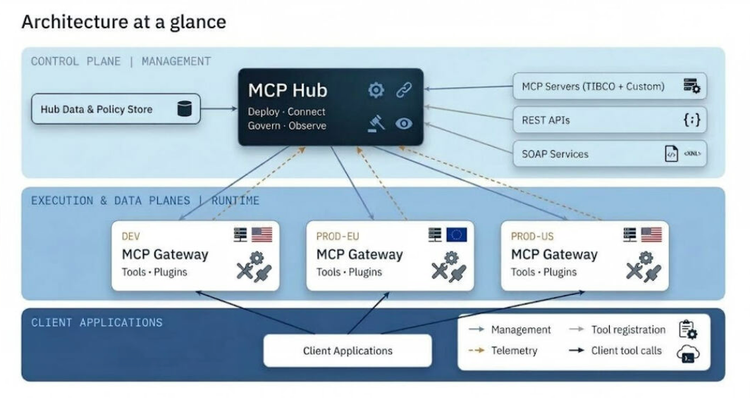
MCP Hub operates within TIBCO Control Plane, while the MCP Gateways it manages run on your Data Planes. Management is central and runtime stays local to the data, so one console can operate many gateways across many Data Planes.
The Problem MCP Hub Solves
When every team wires agents to tools, nobody owns the middle. Typical gaps include:
| Challenge | What it looks like |
|---|---|
| Sprawl | Every team stands up its own MCP server, with no inventory, no owner, and no shared catalog. |
| No blast radius control | An agent that can reach a tool can call it. There is no curation of who sees which tools. |
| Ungoverned data flow | PII, secrets, and unvalidated payloads move between models and back-end systems unchecked. |
| Credential chaos | Long-lived, over-scoped, hand-rolled tokens spread across client applications. |
| Blind runtime | No traffic view, no traces, and no record of which policy allowed or blocked a call. |
| Rewrite tax | Existing REST and SOAP services stay invisible to agents unless someone writes an MCP server. |
Why MCP Hub?
MCP Hub acts as centralized orchestration middleware for enterprise AI and integration workflows:
- Dynamic tool discovery: Clients can use new servers automatically, without manual intervention or code changes, so AI models adapt to new capabilities dynamically.
- Unified observability and governance: Logging, metrics, and error traces are collected in one place, which simplifies monitoring, auditing, and performance optimization instead of leaving visibility fragmented per client.
- Security and compliance: Access policies, rate limits, and usage rules are enforced in one place. Federated authentication control (RBAC) policies ensure only authorized users and agents reach sensitive resources.
- Scalability: The architecture supports horizontal scaling, so multiple MCP servers can run in parallel to handle high request volumes and simultaneous AI tasks.
- No rewrite to be agent-ready: Existing REST and SOAP services become tools through OpenAPI and WSDL import, with no dedicated MCP server to write.
Architecture
- MCP Hub (in Control Plane): the console, catalog, policy staging and push, and token management.
- MCP Gateways (on Data Planes): independent runtimes that handle tool federation, the plugin pipeline, and Virtual Servers. A Data Plane can host many gateways, and each gets a unique path segment so gateways sharing a route resource do not collide.
- Upstream sources: your own and TIBCO-curated MCP servers, REST APIs imported through OpenAPI, and SOAP services imported through WSDL.
- Clients: client applications and agents call a Virtual Server endpoint with a scoped token.
Key Concepts
| Concept | Description |
|---|---|
| Model Context Protocol (MCP) | An open protocol enabling AI applications to discover and call tools, and read prompts and resources, exposed by an MCP server. |
| MCP Gateway | An independent runtime, deployed on a Data Plane, that fronts one or more MCP servers and exposes their tools through a single, governed endpoint. MCP Hub deploys and manages each gateway. |
| MCP server | An upstream service that provides tools, prompts, and resources. You register MCP servers on a gateway, then push them. |
| Tool federation | On push, the gateway discovers the server's tools and makes them callable through the gateway endpoint. MCP Hub reflects these federated tools in the console. |
| Virtual Server | A curated, client-facing MCP endpoint with its own URL, its own auth posture, and its own policy pipeline. |
| Virtual Tool | A tool you create in MCP Hub from an OpenAPI or WSDL specification, or by defining a REST call. It exposes an existing API without a dedicated MCP server. |
| Plugins and governance | Policy controls bound to a Virtual Server or an individual tool to control how its tools, prompts, and resources can be used, for example rate limiting or content filtering. |
| Access tokens | Scoped bearer tokens that client applications present to authenticate their calls. |
Draft, then push. Servers, Virtual Servers, tools, and policy are staged in MCP Hub first and only take effect on the gateway when you push. A full configuration can be composed and reviewed before it ever touches runtime.
How MCP Hub Works and Flow
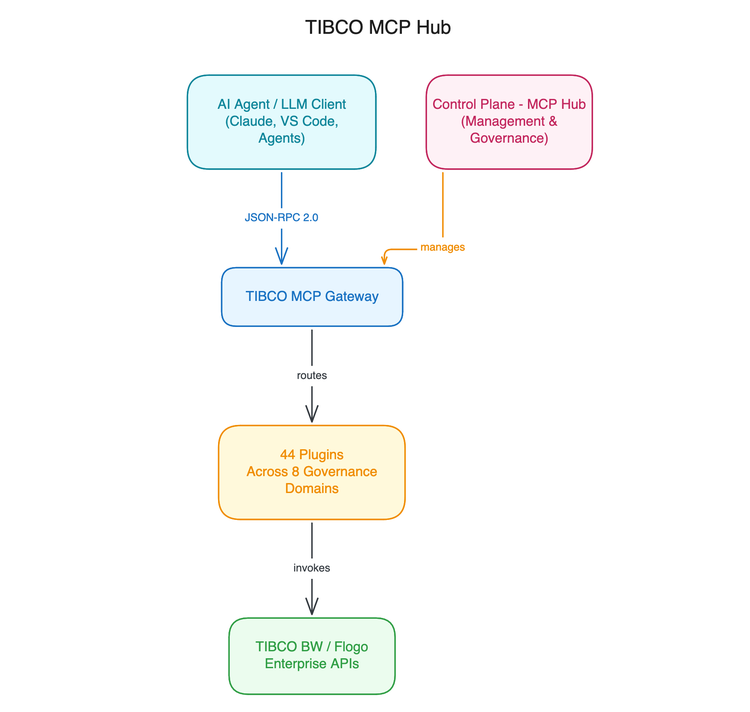
- Configure and Manage on MCP Hub on Control Plane
- Deploy an MCP Gateway to a Data Plane.
- Register an MCP server on the gateway and push it so its tools federate.
- Govern the federated tools: compose Virtual Servers and Virtual Tools, and attach plugins and governance policies.
- Issue scoped access tokens for client applications that call the gateway.
- Monitor the gateway's traffic, traces, and security posture.
What this gives the team running it:
- No cluster access needed. MCP Hub installs and manages the gateway through the Control Plane API.
- Nothing goes live by accident. Draft-and-push applies to servers, Virtual Servers, tools, and policy.
- Observability . Monitoring, Traces, and Security dashboards are built into every gateway.
- Existing APIs count as tools. OpenAPI and WSDL import means no rewrite.
Capabilities
Deploy
- Use the Register Gateway wizard to pick the Data Plane, the route resource (Ingress controller or Gateway API controller), and the deployment mode.
- Lite (Development): a single pod with SQLite storage, the default, suited to evaluation.
- Production: PostgreSQL (built-in or external) and Redis with horizontal scaling, for real workloads.
- MCP Hub installs the gateway through the Control Plane API, so no direct cluster access or manual Helm is required.
- Route, path prefix, mode, and logging can be changed later by reconfiguring and redeploying.
Plan your deployment mode up front. Changing a gateway's deployment mode or configuration later requires a redeploy, and a redeploy deletes all gateway-side data: registered MCP servers, Virtual Tools, Virtual Servers, prompts, resources, and access tokens. If the gateway will carry production traffic, choose Production from the start.
Prerequisites: the Data Plane is registered and online, you have the Capability Manager permission, and the Data Plane provides the required route resource and storage.
Connect
There are three ways to get tools onto a gateway:
- Register by hand: point the gateway at an MCP server's endpoint, transport, and auth, then push to federate its tools.
- Install from the registry: a built-in catalog of ready-to-use servers, including TIBCO-curated entries for Control Plane, Observability, Flogo, and BusinessWorks, plus your own subscription's Custom entries.
- Import a specification: generate MCP tools straight from an OpenAPI (REST) or WSDL (SOAP) document.
However a tool arrives, it is federated, governed, and called the same way.
Compose
Instead of exposing everything a gateway federates, curate a subset into a purpose-built Virtual Server. One gateway can host many.
- Curated surface: pick tools, and optionally prompts and resources, from across several upstream servers and present them by purpose rather than by source.
- Its own front door: each Virtual Server has its own endpoint URL and auth posture: open, gateway-issued token, or an external identity provider.
- Its own policy: plugins and governance are applied per Virtual Server, not per gateway.
- Draft or Live: compose and review, then push when you are ready.
You can also test MCP tools from the console and manage prompts and resources.
Govern
Plugins are bound to a Virtual Server or an individual tool and staged as draft policy until you push. The plugin library spans 44 plugins across eight categories:
- Security
- Data Transform
- Reliability
- Privacy and Compliance
- Validation
- Observability
- Encoding and Format
- Auth and Request
Secure
Client applications authenticate with scoped, expiring, revocable bearer tokens issued per Virtual Server and reconcilable against the gateway.
Observe
Each gateway has built-in Monitoring, Traces, and Security dashboards. The gateway can also forward its application logs to your observability Log server through an optional logs sidecar.
Troubleshooting
The Control Plane User Guide includes a dedicated Troubleshooting MCP Hub topic, for example for a gateway that installs but does not reconcile to Online.
Related Articles
- [ What is MCP Hub KB0138765]: https://support.tibco.com/support-home/kbsearch/article?articleNumber=KB0138765
- [44 Plugin Details KB0138763]: https://support.tibco.com/support-home/kbsearch/article?articleNumber=KB0138763