
How Does TIBCO Platform MCP Hub Secure Enterprise AI Tools Across 8 Plugin Categories?
Summary: The TIBCO Platform MCP Hub is the central management console in the TIBCO Control Plane for Model Context Protocol (MCP) infrastructure. It deploys MCP Gateways, manages Virtual Servers and Virtual Tools, and enforces zero-trust runtime policies using 40+ modular guardrail plugins organized across 8 functional categories.
Key Takeaways (TL;DR)
- Centralized AI Governance: Managed directly inside TIBCO Control Plane to deploy MCP Gateways and federate tools from TIBCO BusinessWorks™, Flogo®, and external REST/WSDL APIs.
- 40+ Granular Plugins: Covers 8 core operational domains: Security, Data Transform, Reliability, Privacy & Compliance, Validation, Observability, Encoding & Format, and Auth & Request.
- Flexible Execution Modes: Plugins execute sequentially or in parallel across 6 modes: Block, Transform, Audit, Parallel, Async, and Off.
- Scoped Token Control: Issues static bearer access tokens restricted by Virtual Server, specific MCP permissions (tools.read, tools.execute, servers.use), and client IP CIDR ranges.
What Is the TIBCO Platform MCP Hub?
The TIBCO Platform MCP Hub is the administrative console within TIBCO Control Plane designed to operate enterprise Model Context Protocol (MCP) infrastructure. MCP is an open-source standard that connects generative AI clients—such as Claude Desktop, VS Code, and autonomous AI agents—directly to enterprise systems.
Instead of exposing unprotected backend APIs to Large Language Models (LLMs), administrators deploy MCP Gateways onto user Data Planes. Upstream MCP servers (including TIBCO BusinessWorks™ 5x/6x, TIBCO Flogo®, or OpenAPI/WSDL endpoints) register their capabilities to the gateway. The MCP Hub then groups these capability sets into client-facing Virtual Servers and enforces strict runtime policies by attaching plugins to request pipelines.
What Is the TIBCO Platform MCP Hub?
The TIBCO Platform MCP Hub is the administrative console within TIBCO Control Plane designed to operate enterprise Model Context Protocol (MCP) infrastructure. MCP is an open-source standard that connects generative AI clients—such as Claude Desktop, VS Code, and autonomous AI agents—directly to enterprise systems.
Instead of exposing unprotected backend APIs to Large Language Models (LLMs), administrators deploy MCP Gateways onto user Data Planes. Upstream MCP servers (including TIBCO BusinessWorks™ 5x/6x, TIBCO Flogo®, or OpenAPI/WSDL endpoints) register their capabilities to the gateway. The MCP Hub then groups these capability sets into client-facing Virtual Servers and enforces strict runtime policies by attaching plugins to request pipelines.
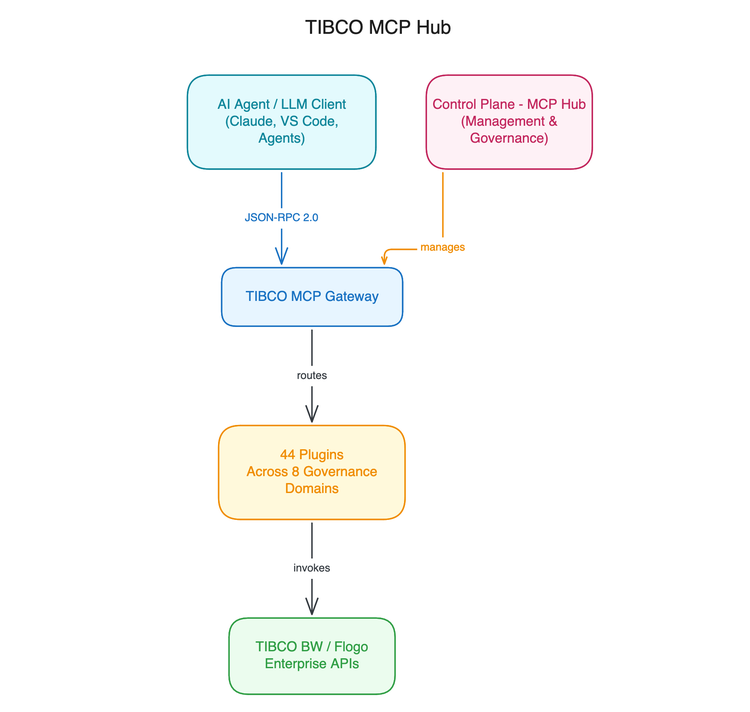
What Are the 8 Plugin Categories in TIBCO MCP Hub?
The TIBCO MCP Hub organizes its 44 governance plugins into 8 distinct functional categories:
- Security Plugins (14 Plugins): Shield Virtual Servers against prompt injection, SQL attacks, harmful content, secret leaks, and unauthorized access.
- Data Transform Plugins (9 Plugins): Reshape payloads, normalize arguments, convert HTML to Markdown, repair malformed JSON, and translate timezones.
- Reliability Plugins (7 Plugins): Throttles traffic, caches idempotent tool results, manages retries, enforces output budgets, and trips circuit breakers.
- Privacy and Compliance Plugins (4 Plugins): Redacts PII, enforces web scraping/robots licensing terms, and injects privacy notices or license headers.
- Validation Plugins (3 Plugins): Validates tool arguments and responses against OpenAPI/JSON schemas, static constraints, and live citations.
- Observability Plugins (3 Plugins): Customizes OpenTelemetry span attributes, sends HTTP webhooks, and exports operational metrics/traces.
- Encoding and Format Plugins (2 Plugins): Formats code, trims whitespace, pretty-prints JSON, and encodes specialized data streams.
- Auth and Request Plugins (2 Plugins): Extracts JWT claims during authentication and enforces fine-grained Role-Based Access Control (RBAC).
For more information on Plugins refer KB Article KB0138763
How Do Execution Modes and Error Handling Work in MCP Hub?
Plugins run across six execution modes that dictate whether a policy can block requests or modify payloads:
| Execution Mode | Blocks Request | Modifies Payload | Execution Ordering & Behavior |
| Block | Yes | Yes | Serial & chained. Used for strict policy enforcement. |
| Transform | No | Yes | Serial & chained. Used to reshape payloads or redact PII. |
| Audit | No | No | Serial. Violations are logged; payload modifications are discarded. |
| Parallel | Yes | No | Runs in parallel with other Parallel plugins; stops at the first block. |
| Async | No | No | Background side-effect; runs after all other modes for telemetry. |
| Off | No | No | The plugin is not loaded for the specified scope. |
Execution Order Rule: Regardless of individual plugin priority numbers (1–1000), modes always execute in this exact sequence: Block Transform Audit Parallel Async.
Error Handling Policies
When a plugin encounters a system error at runtime, its behavior is governed by one of three error-handling settings:
- fail (Default): Halts the request immediately and returns the error. Highly recommended for security and privacy plugins (e.g., PII masking or permission checks) to prevent silent bypasses during plugin outages.
- ignore: Logs the error and continues request processing without applying the plugin check.
- disable: Logs the error, automatically disables the failing plugin, and continues processing.
How Do You Compose and Push Governance Policies?
Setting up governance on a Virtual Server involves five administrative steps in TIBCO Control Plane:
- Open the Governance Canvas: In MCP Hub, select an active MCP Gateway, open the Virtual Servers tab, and click Configure on the target Virtual Server.
- Select Request Flow: Choose the specific flow to govern using the Govern switch: Tool calls, Prompt fetches, or Resource fetches.
- Apply Starter Policies or Add Custom Plugins: Apply pre-built starter presets (Secure baseline, Observability only, or Strict compliance) or select individual plugins from the catalog.
- Configure Scope & Mode: Set execution mode (Block, Transform, Audit, etc.), priority, and error handling (fail, ignore, disable). Plugins can apply globally to the Virtual Server or be customized per individual tool.
- Push Changes to Gateway: Policy modifications remain in draft state until you click Push Changes to Gateway. The hub applies the policies to the gateway runtime instantly.
Frequently Asked Questions (FAQ)
How are client access tokens managed in TIBCO MCP Hub?
The MCP Gateway generates and signs static bearer access tokens. Tokens are scoped to a single Virtual Server, can be restricted by allowed IP CIDR ranges, require explicit expiration dates, and enforce permissions such as tools.read, tools.execute, and servers.use.
Can governance policies be overridden for a single tool?
Yes. Administrators can keep global defaults for all tools on a Virtual Server or select a specific tool on the Scope bar to apply stricter or customized plugin rules.
What happens if an MCP Gateway does not support prompt or resource dispatch?
Governance for prompt and resource fetches is enforced at runtime only on gateways supporting those flows. If unsupported, the canvas displays Representable, not yet enforced, meaning policies are saved and pushed but only tool calls are actively enforced.
Resources
- TIBCO Control Plane 1.20.0 User Guide
- Setting Up Plugins and Governance Policies in MCP Hub
- Model Context Protocol (MCP) Specification
Related Articles
- [ What is MCP Hub KB0138765]: https://support.TIBCO.com/support-home/kbsearch/article?articleNumber=KB0138765
- [44 Plugin Details KB0138763]: https://support.TIBCO.com/support-home/kbsearch/article?articleNumber=KB0138763