
Azure Service Bus Dead-Letter Queue (DLQ) Routing in TIBCO BusinessWorks™
The Problem with the “Abandon” Loop
Enterprises running TIBCO BusinessWorks™ (BW6/BWCE) with Azure Service Bus as their messaging broker frequently encounter a specific operational roadblock: a message is consumed however fails validation within the process logic, and the message must be isolated immediately.
Historically, routing that message gracefully to the Dead-Letter Queue from within the BW process was not natively supported. Developers had to rely on abandoning the message.
The overhead of Message Abandonment
When a BW process abandons a message, it is released back to the Azure Service Bus broker. The broker repeatedly redelivers the message until it reaches the queue’s pre-configured MaxDeliveryCount threshold. Only after this threshold is exhausted does Azure Service Bus push the message into the DLQ.
Does this work? Technically, yes. However, this approach introduces significant system liabilities:
- Processing Overhead: Repeated redeliveries consume unnecessary compute, network bandwidth, and token processing cycles.
- Loss of Context: Azure Service Bus stamps the dead-lettered message with a generic system code: MaxDeliveryCountExceeded. The original runtime validation exception or business logic failure context is entirely lost.
- Triage & Compliance Risks: Operations teams cannot easily construct automated reprocessing workflows when every message carries identical system tags. For regulated environments, this gap violates explicit auditability and message-disposition compliance standards.
What Changed in AMQP Plug-in v6.5.3
We added a new activity to the AMQP palette: **AMQPDeadLetterMessage**.
It does exactly what the name says. Instead of waiting for delivery loops to expire, process logic can explicitly move messages that fail business validation directly to the system-defined dead-letter sub-entity.
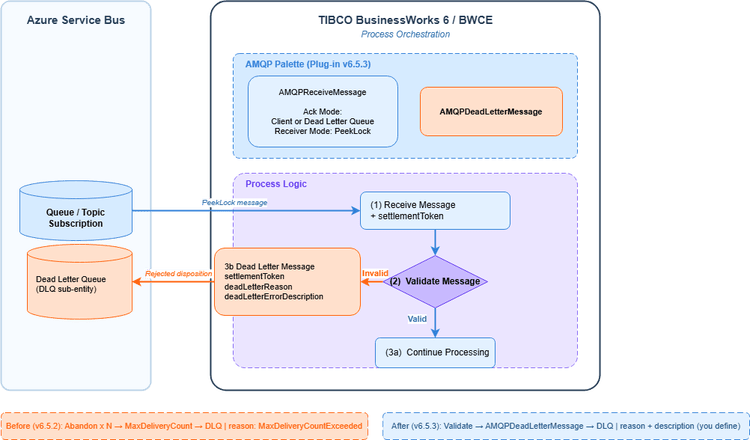
- Token-Based Settlement: The AMQPReceiveMessage activity fetches the message in PeekLock mode and generates a unique settlement token. This token acts as the deterministic identifier connecting the payload to its final disposition.
- Immediate Rejection: When the settlement token is passed to the AMQPDeadLetterMessage activity, the plug-in issues an AMQP Rejected disposition frame back to the Azure broker, moving the message to the DLQ instantly without further redelivery attempts.
Technical Reference & Schema Configuration
The AMQPDeadLetterMessage activity requires specific metadata fields to execute the dead-letter transaction while preserving runtime execution context.
Metadata Schema Specifications
Input Field Data Type Requirement Description
settlementToken String Required The tracking identifier mapped directly from the output of the upstream AMQPReceiveMessage activity.
deadLetterReason String Optional A precise, human-readable reason code describing the business rule violation (e.g., MALFORMED_PAYLOAD, VALIDATION_FAILED, DUPLICATE_ORDER).
deadLetterErrorDescription String Optional Detailed diagnostic telemetry, such as the exact stack trace, validation exception string, or specific missing fields.
Operational Guardrails
Operational Guardrails
- Pre-emptive Token Validation: The plug-in validates the status and Time-To-Live (TTL) of the settlement token locally before initiating the remote AMQP call, preventing unhandled broker exceptions.
- Transient Fault Handling: Built-in retry mechanisms handle transient network interruptions during the settlement phase, ensuring reliable delivery confirmation.
Implementation and Availability
For operations and DevOps engineers, this metadata enrichment transforms the DLQ from an unindexed repository into an actionable data stream for automated remediation.
To implement native DLQ routing within your integration workflows:
- Upgrade Requirement: Ensure your runtime environment is upgraded to TIBCO ActiveMatrix BusinessWorks™ Plug-in for AMQP v6.5.3.
- Design Pattern: Embed the AMQPDeadLetterMessage activity directly inside the catch or error-handling branches of your orchestration processes.
For complete configuration specifications regarding acknowledgement modes, token TTL optimization, and transient error handling codes, refer to the TIBCO ActiveMatrix BusinessWorks™ Plug-in for AMQP User Guide.